




Alipay & WeChat Pay for International Travelers
First time in China? Payment is easier than you think.
From morning coffee and metro rides to street food and museum tickets, mobile payments are part of everyday life in China. International travelers can use Alipay and WeChat Pay by registering with an overseas phone number and linking a supported international bank card—no Chinese bank account required. This guide will show you how to get set up and start paying with ease.
In This Guide
- Before You Start
- Part One: Setting Up Alipay
- Part Two: Setting Up WeChat Pay
- How to pay in China
- Fees
- Good to Know
- Payment Not Working?
- FAQ
What You Need Before You Start
Prepare the following:
- A passport
- An overseas mobile phone number that can receive verification codes
- A supported international credit or debit card
- Your bank card’s billing information
- The latest version of Alipay and WeChat
International travelers can register using either an overseas or Chinese phone number. Major international card networks—including Visa, Mastercard, American Express, JCB, Diners Club, Discover and UnionPay—may be supported, although availability can vary between the two apps and individual card issuers.
Before linking your card
Make sure international and online transactions are enabled on your card. Your bank may send you an SMS, email or in-app notification to approve the connection.
The name entered in the payment app should match the name shown on your passport and bank records as closely as possible.
Part one : Setting Up Alipay
For most first-time visitors, Alipay is the easiest place to begin. Its international interface is relatively straightforward, and the app also provides access to transport codes, taxis, attraction tickets and other travel services.
Step 1:Create Your Alipay Account
Download Alipay from the App Store or Google Play, then create an account using your mobile number. An overseas number works perfectly—just select the correct country code and enter the verification code sent to your phone.
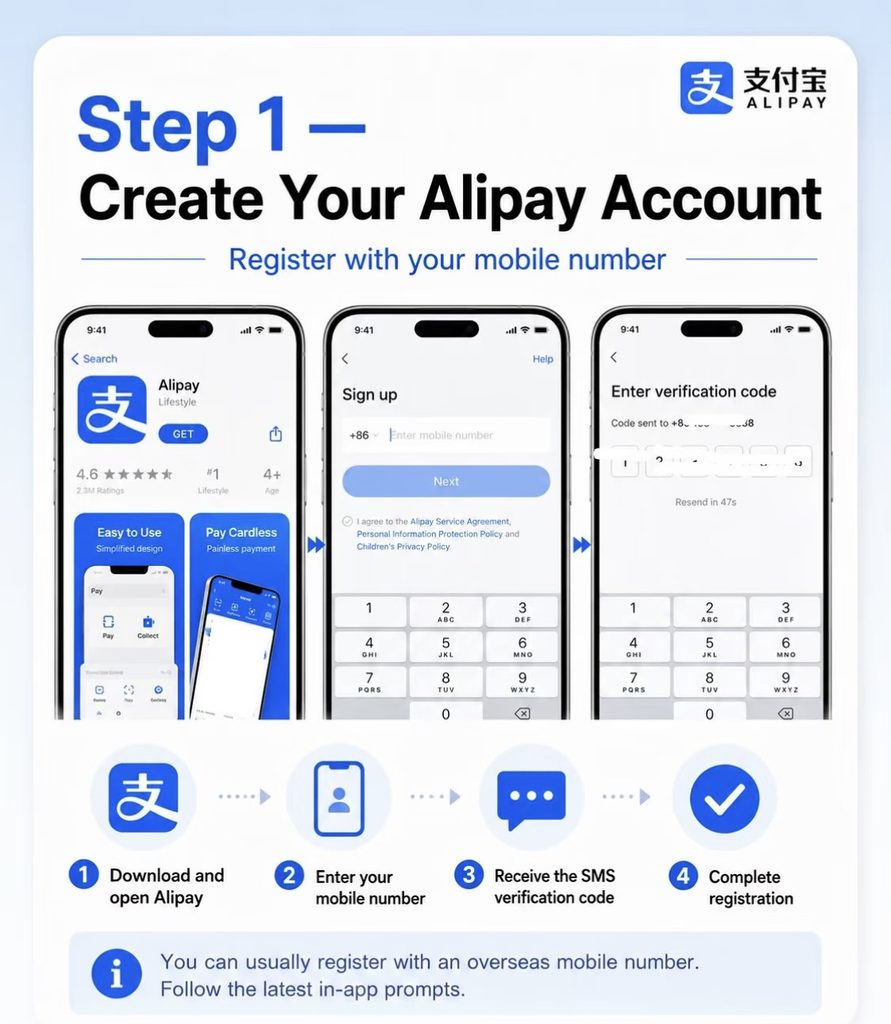
(Register with your usual phone number—no Chinese SIM card required.)
If the app does not appear in your language , go to:
More options→ Switch Language → choice your own language
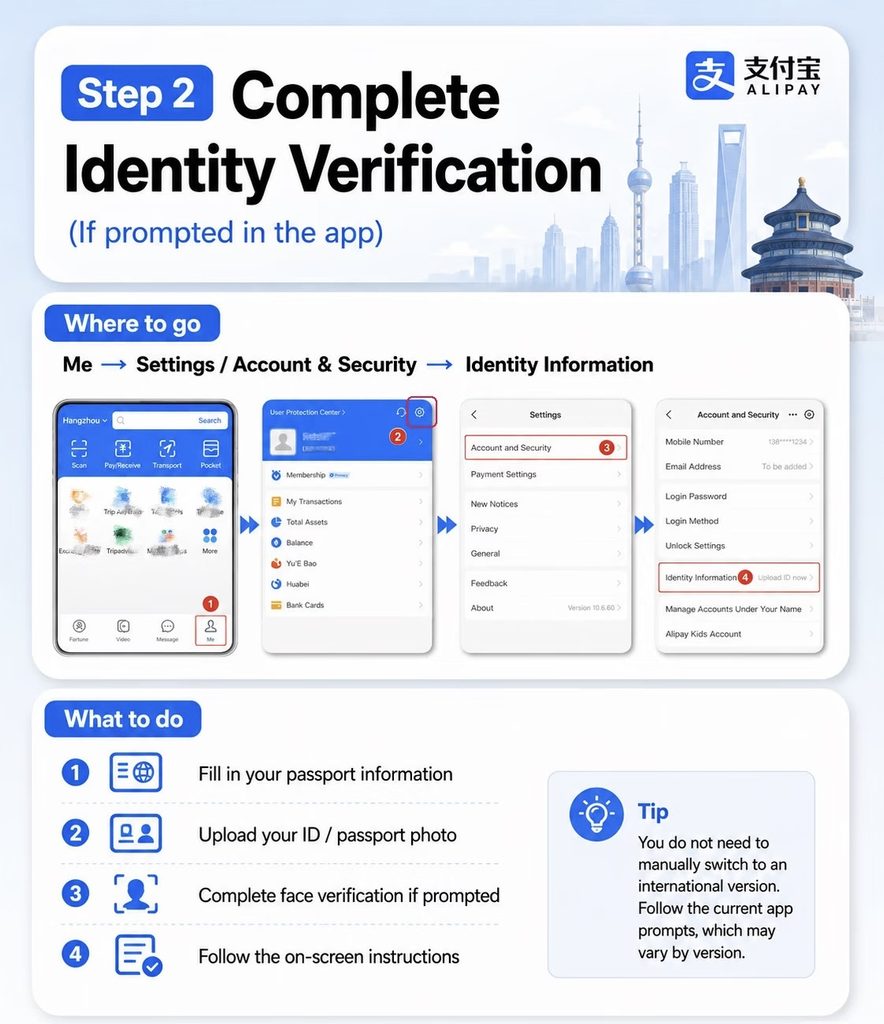
Step 2 : Complete Identity Verification
Next comes a quick identity check. Select Passport as your ID type and upload a clear photo of the information page, making sure all four corners are visible and free from glare. You may also be asked to complete a short facial verification—just follow the on-screen prompts.
Quick Steps:
Me → Settings → Account and Security → Identity Information
Step 3 : Add Your Bank Card
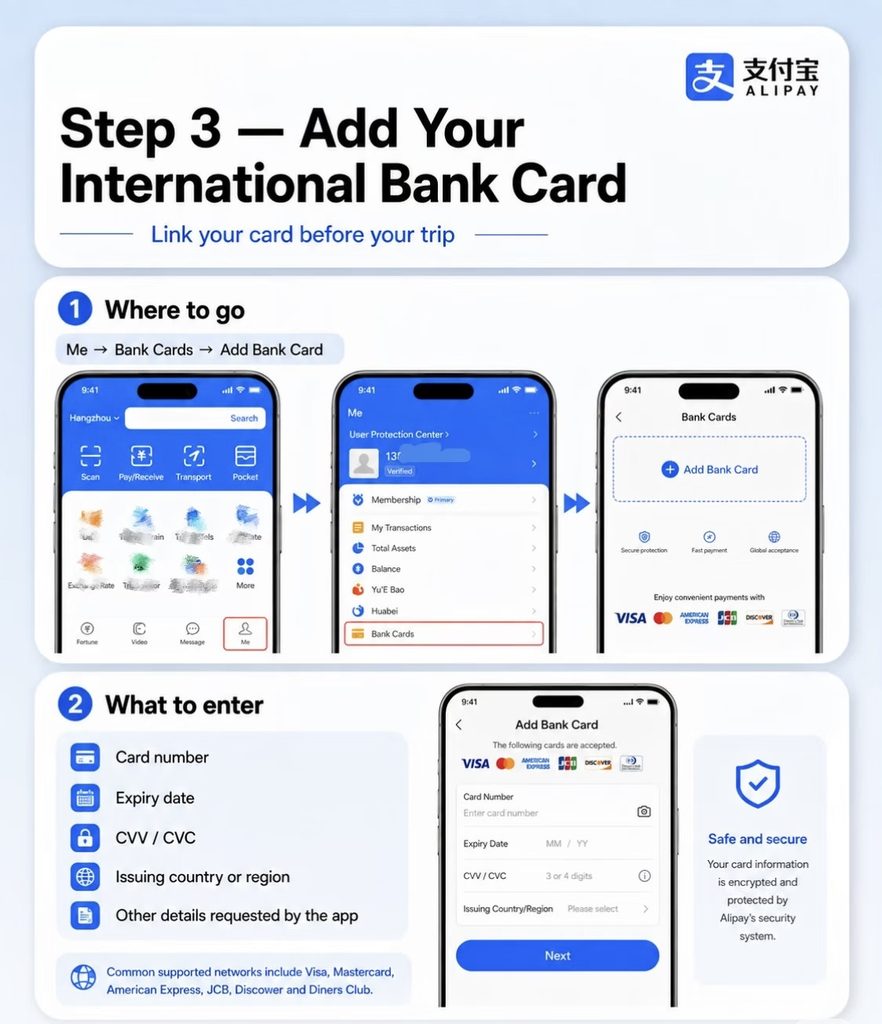
Once you’re inside the app, look for “Add Card” or follow this path:
Me → Bank Cards → Add Bank Card
Enter your card number and follow the instructions on the screen. Alipay supports many major international credit and debit cards, although acceptance may depend on your bank and card issuer.
Step 4 : Create Your Payment Password
Alipay may ask you to create a six-digit payment password. This is used to approve payments and is different from your bank card PIN.
Choose a number you can remember, but avoid using something obvious such as your birthday. Never share this password or an SMS verification code with anyone.
Part two : Setting up Wechat pay
WeChat isn’t just for messaging—it’s also one of the most widely used ways to pay in China. Set up WeChat Pay before your trip, and you’ll have another easy way to pay for everyday purchases.
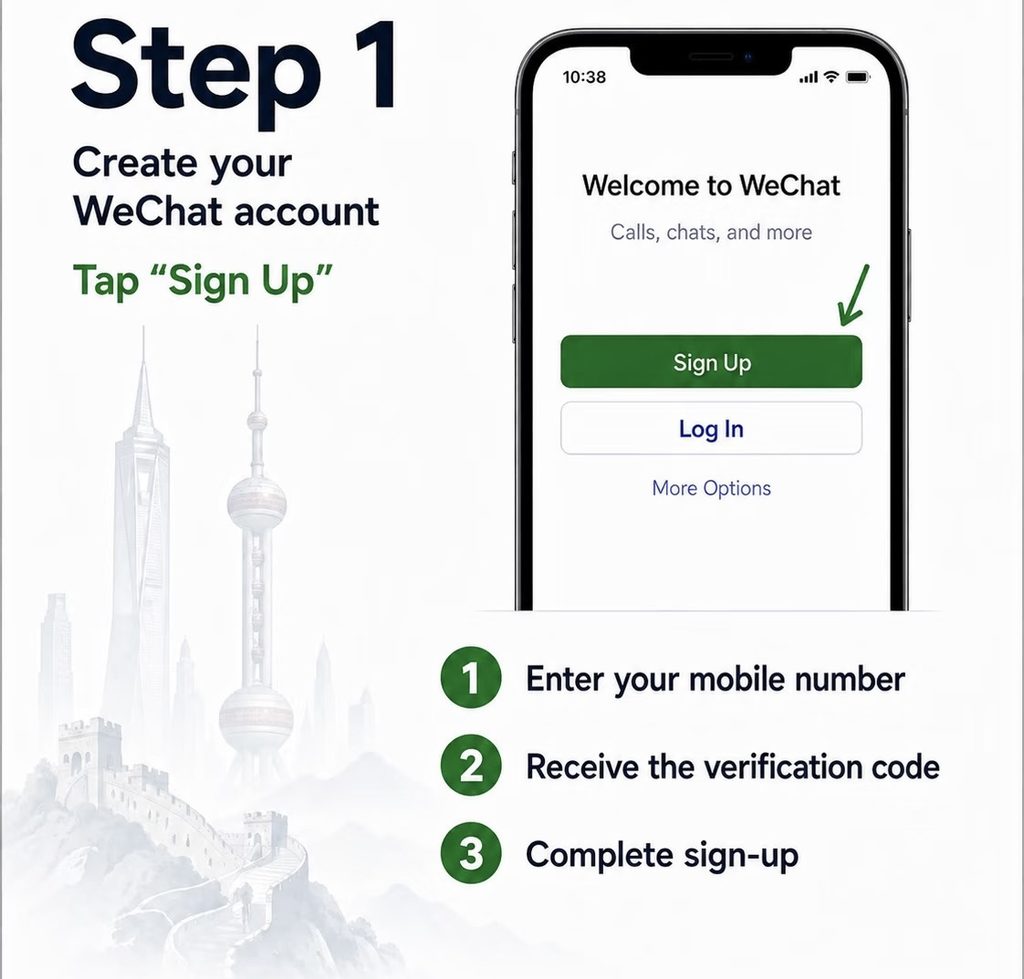
Step 1 : Download & Sign Up
Download WeChat from the App Store or Google Play, then register with your usual mobile number. Select the correct country code and follow the on-screen prompts to complete the security check.
If you already use WeChat, simply update it to the latest version before continuing.
Step 2: Enable Wechat Pay
Once you’re logged in, tap:
Me → Services → Wallet
This is where you can add a bank card, manage your payment settings and open your payment code.
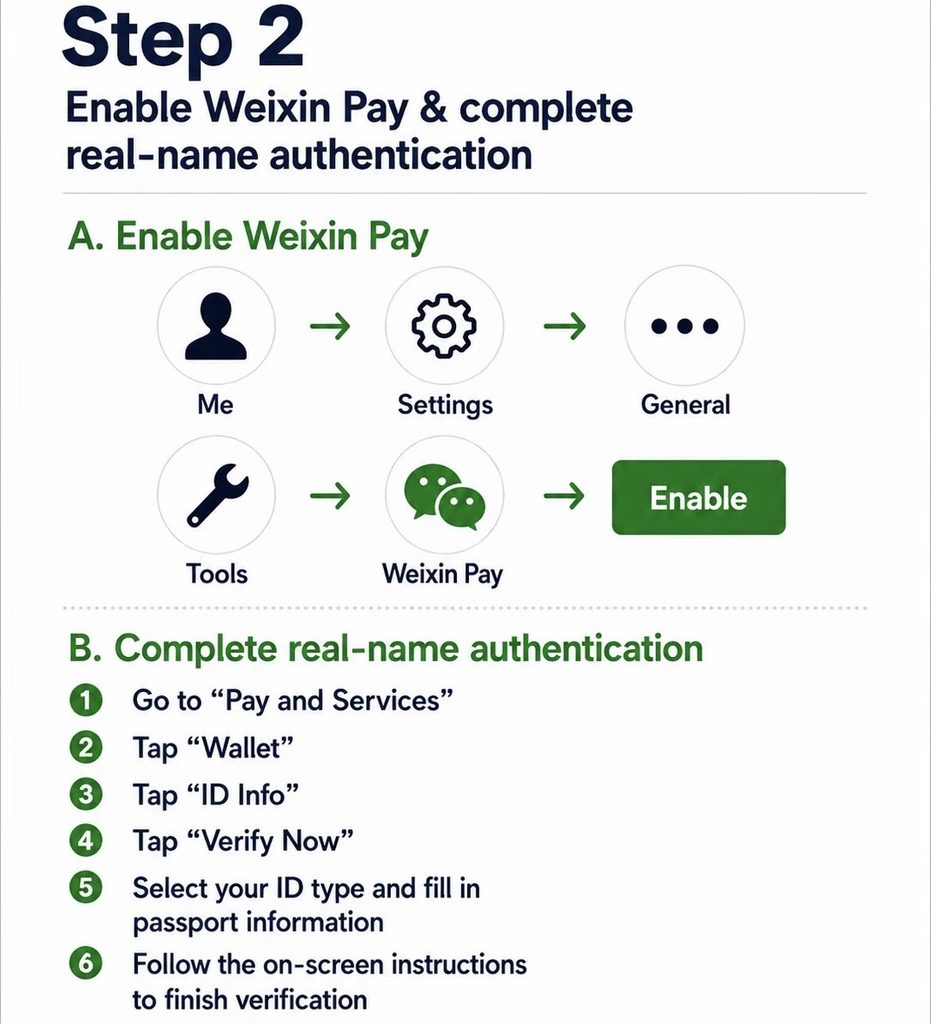
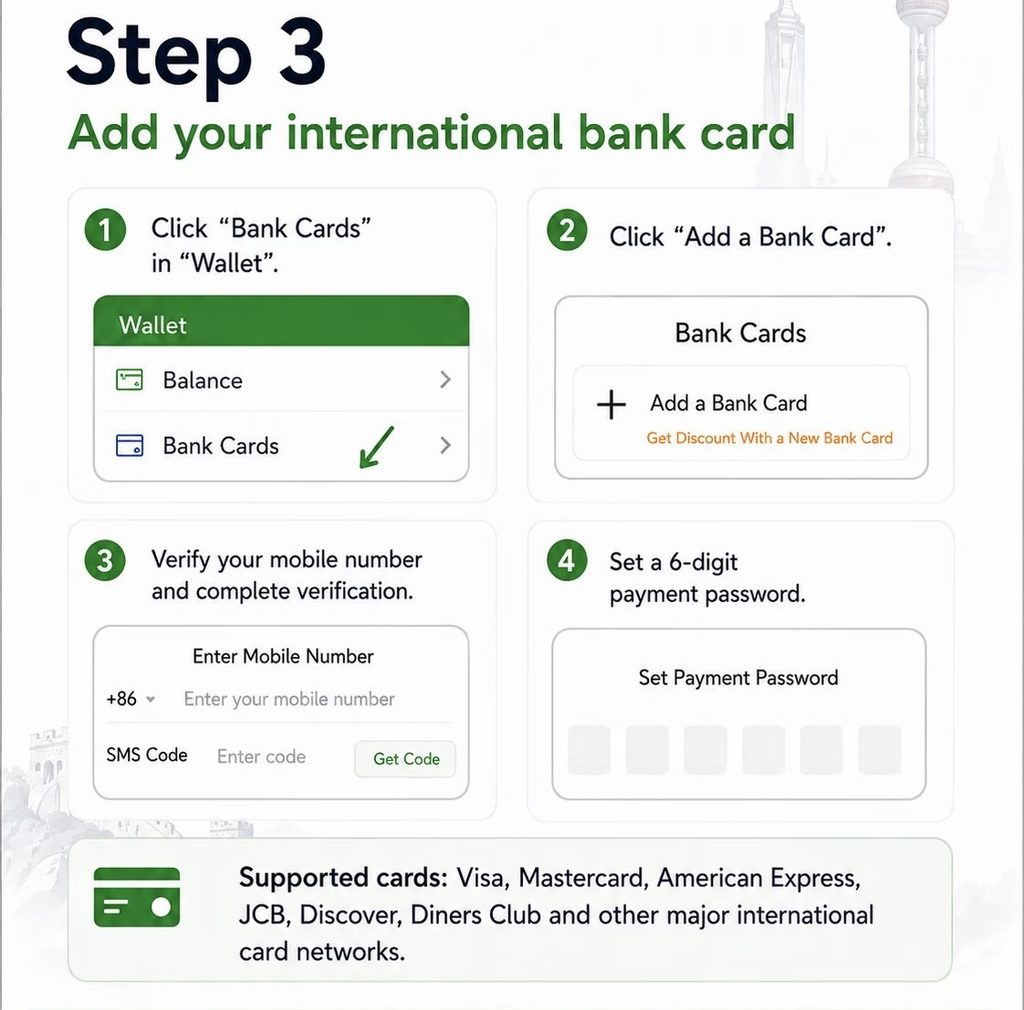
Step 3: Add your Bank Card
Inside Wallet, tap:
Cards → Add a Card
Enter your card number and follow the instructions on the screen. Make sure the cardholder name matches the name used for your WeChat account and passport.
Your bank may send an SMS or in-app notification to approve the connection.
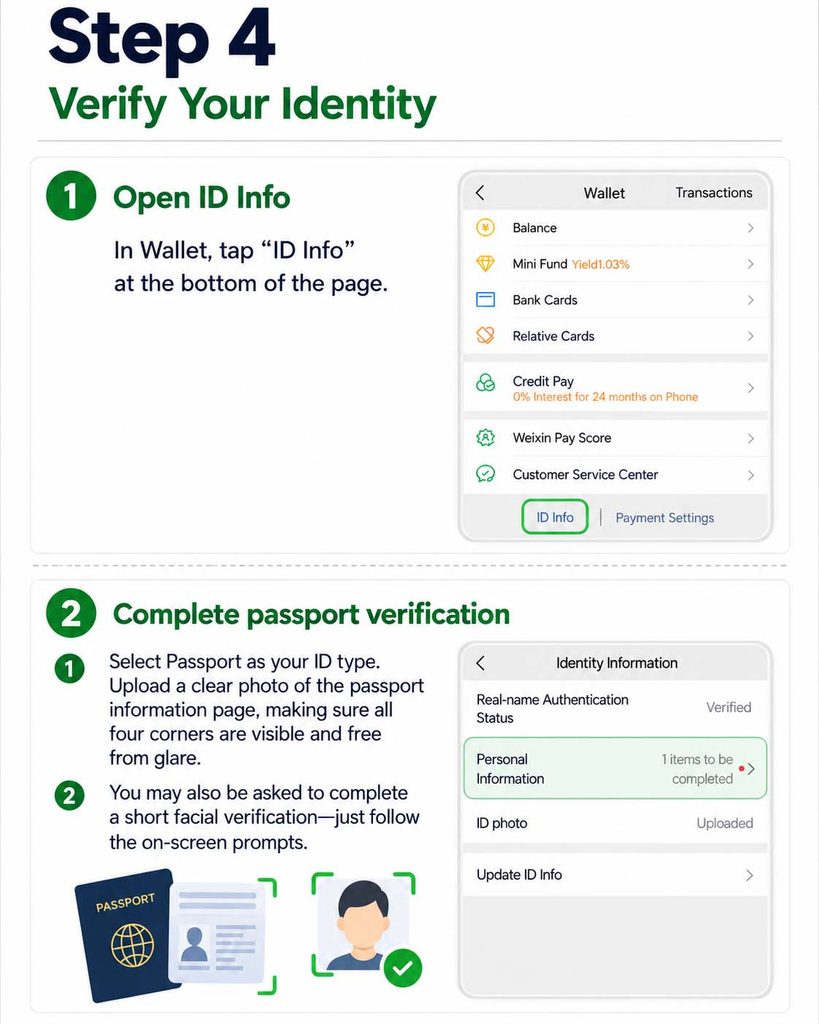
Step 4: Verify Your Identity
Next comes a quick identity check. Select Passport as your ID type and upload a clear photo of the information page, making sure all four corners are visible and free from glare.
You may also be asked to complete a short facial verification—just follow the on-screen prompts.
How to Pay in China
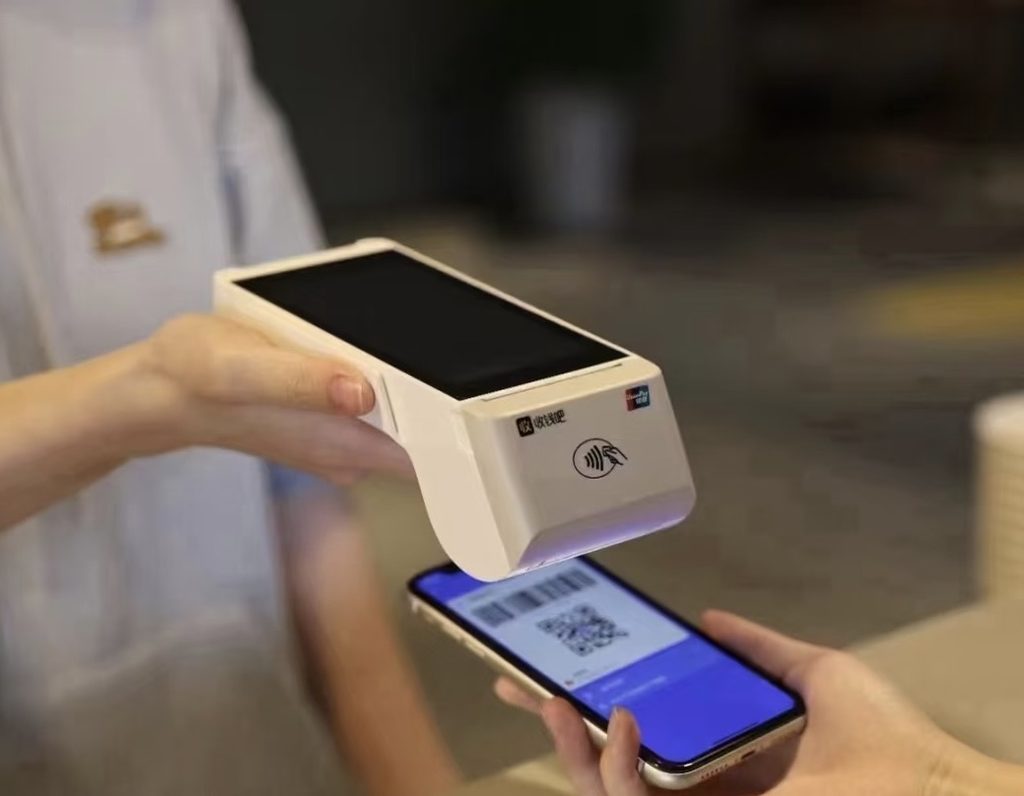
Once your card is linked, paying with Alipay or WeChat Pay works almost the same way. At most shops and restaurants, you’ll either scan the merchant’s QR code or show your payment code to the cashier.
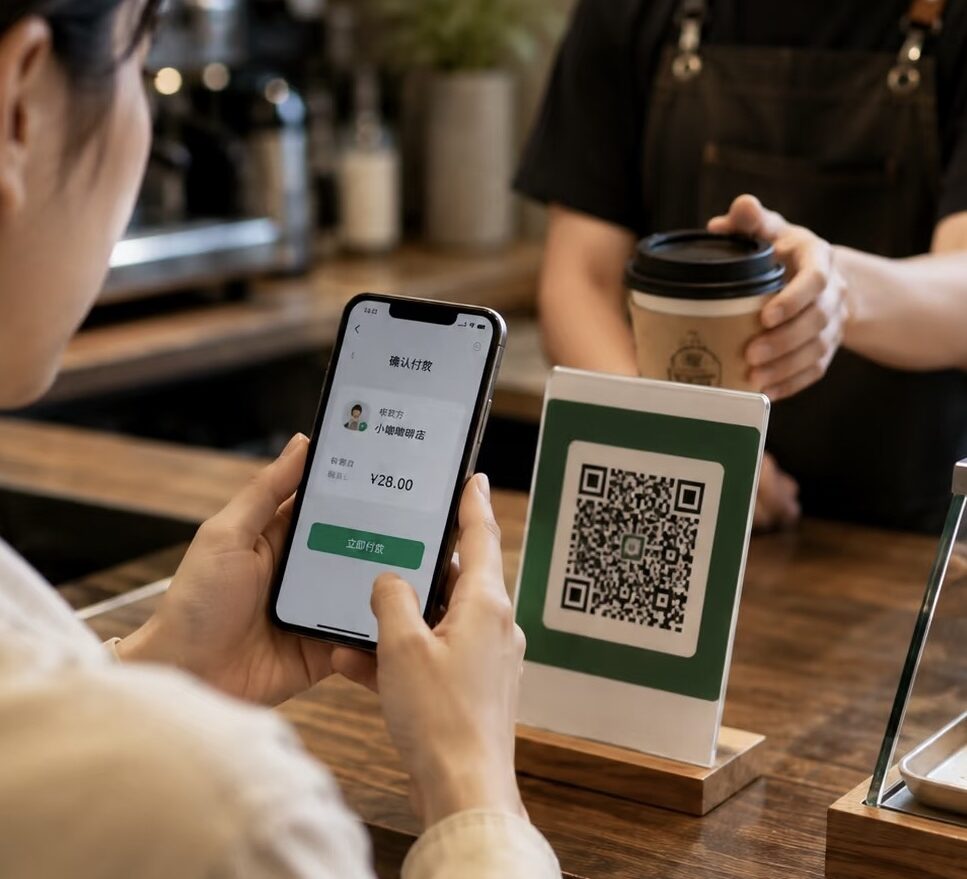
Option 1 Your Scan Them
See a QR code at the counter or on your table? Open Scan in Alipay or WeChat, point your camera at the code, and enter the amount if needed.
Before confirming, take a second to check the merchant’s name and payment amount.
Quick Steps
Open Scan → Scan the QR code → Enter the amount → Confirm

Option 2 They Scan You
At supermarkets, shopping malls and larger restaurants, the cashier may ask for your payment code instead.
Open Pay/Receive in Alipay or Money in WeChat, then show the code on your screen. The cashier will scan it and the payment amount will usually appear automatically.
Quick Step
Open your payment code → Show it to the cashier → Check the amount → Pay
Fees
Most everyday payments are small enough to avoid an extra platform fee. When using an international bank card through Alipay or WeChat Pay, transactions of RMB 200 or less generally have no platform service fee, while payments over RMB 200 may include a 3% service fee.
Your card issuer may also charge a foreign transaction or currency conversion fee. This is separate from the payment-app fee, so check with your bank before you travel.
tips:
Good to know: Temporary fee-waiver offers may be available for new international-card users. Check the latest offer shown in your app.
Good to Know
01
Made For Purchases
International cards linked to Alipay or WeChat Pay are mainly used for purchases. Features such as personal transfers, wallet top-ups and WeChat Red Packets may not be available.
02
Keep A Backup
Set up both Alipay and WeChat Pay if possible, and carry a physical bank card and a small amount of RMB cash. If one payment method does not work, you’ll always have another option.
03
Stay Connected
You’ll need a reliable internet connection to open payment codes and confirm transactions. Make sure your roaming, eSIM or local mobile data is ready before heading out.
04
Keep Your Code Private
Treat your payment code like a bank card. Only show it when you are ready to pay, and never send screenshots of your payment code, password or SMS verification code to anyone.
05
Always Check The Amount Before Confirming
Especially when you scan a merchant QR code and enter the amount yourself.
Payment Not Working?
| Don’t panic—most payment problems can be sorted out in a few minutes. Find the situation that matches yours and try the steps below. |
01
Card won’t link ?
Make sure your cardholder name and billing information match your bank records. Check that identity verification is complete and that your card supports international and online transactions.
If it still won’t connect, contact your card issuer—they may need to approve the card link.
Quick Steps
Check your details → Complete verification → Contact your bank
02
Payment declined ?
Start by checking your internet connection and any verification message from your bank. Then try another linked card, switch between Alipay and WeChat Pay, or ask the merchant for a different payment QR code.
If the payment keeps failing, stop retrying and use a backup method.
Quick Steps:
Check connection → Approve bank alert → Try another app or card
03
Paid, but the merchant Can’t see it ?
Before paying again, open your transaction history and check the payment status.
If it says Successful, show the digital receipt to the merchant. If it says Processing, wait for the status to update or contact the app’s Help Center—don’t pay twice until you know what happened.
Quick Steps
Check transaction history → Show the receipt → Don’t pay twice
04
Still not working ?
Try the other payment app, use a physical bank card, or pay with RMB cash. You can sort out the app or card issue later without holding up the queue.
F&Q
Do I need a Chinese bank account?
No. You can link a supported international debit or credit card directly to Alipay or WeChat Pay.
Can I register with an overseas phone number?
Yes. Just make sure your number can receive SMS verification codes.
Which international cards can I use?
Major cards such as Visa and Mastercard are generally supported. Availability may vary by app, card type and issuing bank.
Can I set everything up before arriving in China?
Yes—and it’s a good idea. Register, complete passport verification and link your card before your trip, so you have time to fix any issues.
Should I download both Alipay and WeChat?
You don’t have to, but having both gives you a useful backup. Some shops, services and mini programs may work better with one app than the other.
Can I send money to friends or use Red Packets?
Usually not with an international card. Overseas cards are mainly used for merchant purchases, while transfers, balance top-ups and Red Packets may be unavailable.
Do I still need to carry cash?
A small amount of RMB is always helpful. It can save the day if your phone has no signal, the app stops working or a payment is declined.
You’re Ready to Pay in China
That’s it—you’re ready to go. Once Alipay and WeChat Pay are set up, everyday payments in China are much easier than they first seem.
Keep both apps handy, bring a backup card or a little cash just in case, and you’ll be ready for everything from your morning coffee to a late-night snack or metro ride home. Save this guide before your trip, and come back to it anytime you need a quick refresher.